


Most subscription brands I talk to have a retry schedule. Far fewer have a decline policy. The schedule says "try again on day 1, 3 and 7". The policy says which declines deserve those retries, which ones need different card data first, and which ones you are not allowed to touch again.
That difference now costs real money. Visa and Mastercard both charge for retries that break their rules, and both publish the signals you need to stay inside them: Visa groups every decline response code into four categories, and Mastercard attaches a Merchant Advice Code (MAC) that tells you whether and when to try again. Most gateways pass these through. Many billing setups ignore them.
This guide is the reference I wish every ops team had pinned: the soft vs hard decline split, the codes that matter for renewals, the network retry limits as of October 2026, and a retry plan that recovers revenue without paying fees for it. For the wider picture on preventing and recovering failed payments, see our guides on how to reduce failed payments in ecommerce and improving ecommerce payment approval rates.
Key takeaways
- A soft decline is a temporary "not now" from the issuer and can be retried within limits. A hard decline means the issuer will not approve this card for this payment, and retrying it breaks network rules.
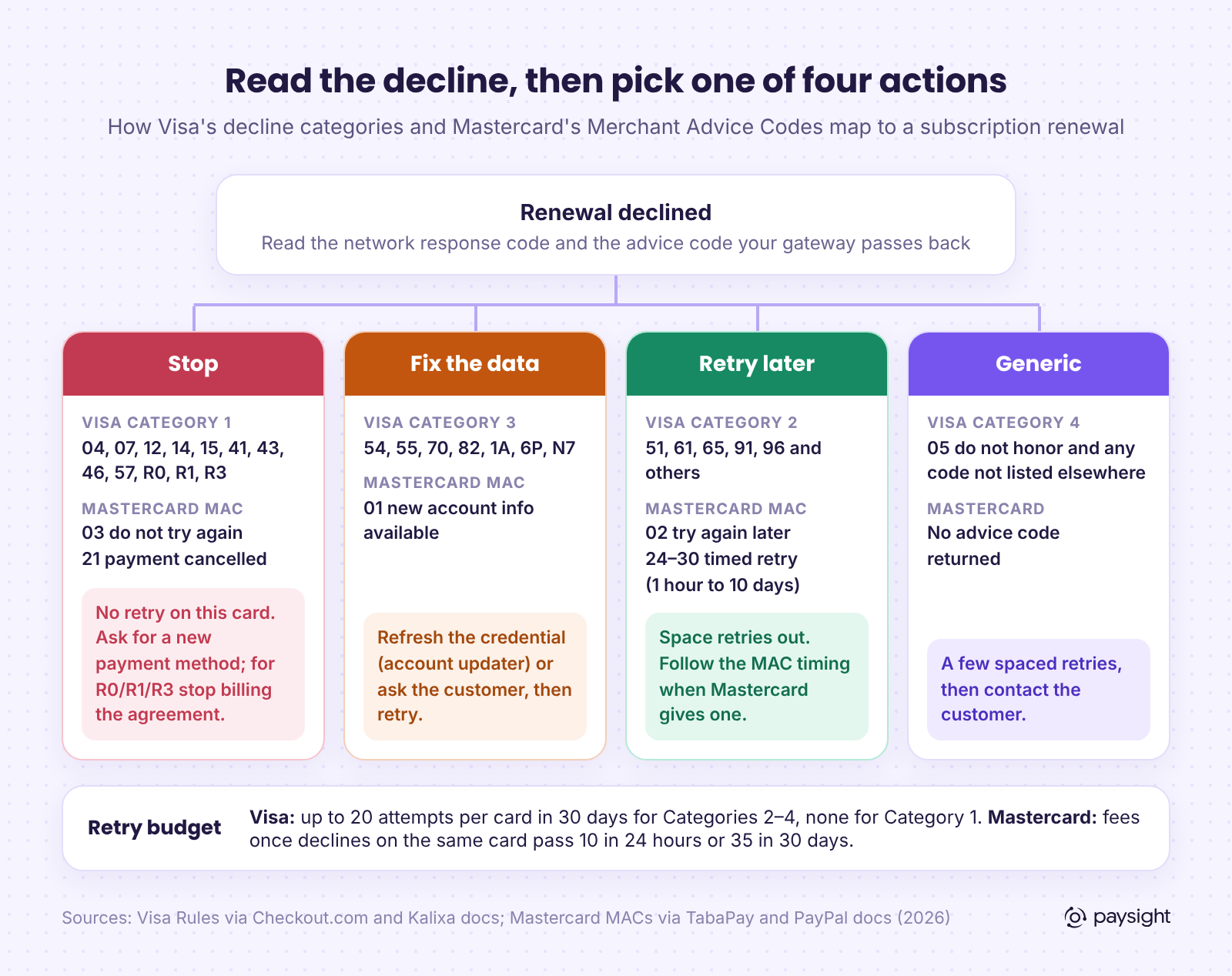
- Visa sorts decline codes into four categories. Category 1 codes (04, 07, 12, 14, 15, 41, 43, 46, 57, R0, R1, R3) must never be retried. Categories 2–4 allow up to 20 attempts per card in 30 days.
- Mastercard's Merchant Advice Codes tell you what to do next: 03 and 21 mean stop, 01 means get new card details, 02 and 24–30 mean retry later, with 24–30 giving the exact wait.
- Code 05 "do not honor" is Visa's generic Category 4. It can be retried, but treat it as a soft decline with a short leash, not a free pass.
- Moving a hard decline to another gateway or MID does not make it soft. Use extra routes for outages and processing errors, not to get around an issuer's answer.
Soft vs hard declines: the short version
Every card decline comes back with a response code from the issuer (or from the network acting for it). Two numbers matter for subscriptions: the response code, which says why, and the advice code, which says what to do next. Your gateway may translate both into its own names. Stripe, for example, maps them into decline codes such as insufficient_funds plus an advice_code of do_not_try_again, try_again_later or confirm_card_data, and also exposes the raw network_decline_code and network_advice_code.
The labels "soft" and "hard" are informal. The networks use more precise buckets, and that is where the useful detail sits.
How Visa groups decline codes
Visa's rules put every decline response code into one of four categories, and the category decides whether you may reattempt. The current version of these rules took effect in April 2021. The allowance for Categories 2–4 rose from 15 to 20 attempts in 30 days in May 2025, so documentation that still says 15 is out of date. Visa also keeps separate counters for customer-initiated and merchant-initiated transactions, so a subscription renewal (merchant-initiated) has its own budget.
Code lists as published in processor documentation of the Visa Rules (Kalixa, Adyen, PayPal), October 2026. Code 14 (invalid account number) sits in both Category 1 and Category 3: you may not retry the same card number, and it also counts toward Visa's data-quality monitoring.
Two details catch subscription brands out. First, Category 3 is not a free retry: Visa expects you to revalidate the card data before trying again, and processors report a data-quality fee once a merchant passes 25,000 card-not-present Category 3 declines in 30 days. Second, a retry has to be the same transaction. Processor guidance on the Visa rules is to keep the original data elements consistent across reattempts rather than changing them to coax a different answer.
Mastercard Merchant Advice Codes
Mastercard takes a different approach. Instead of fixed categories, the issuer (or Mastercard) can attach a Merchant Advice Code to the decline. For recurring billing, the MAC is often more useful than the response code, because it tells you directly what to do.
Mastercard also pairs three card-not-present response codes with MACs: 79 (lifecycle), 82 (policy) and 83 (security). With MAC 01, new card details may be available, so check your account updater before the next attempt. With MAC 03, do not retry. Response 83 with MAC 03 signals suspected fraud.
Retry limits and fees, side by side
Both networks charge the acquirer for retries that break their rules, and acquirers pass those fees on, sometimes with a markup. Exact amounts vary by region and are published mostly through processor bulletins rather than by the networks themselves, so treat these as indicative and check your own processor's schedule.
Per-retry fees look small, but they scale with your subscriber base, and they are the visible part of the cost. The bigger one is issuer trust. Stripe warns that issuers can read extra retries as potential fraud, which can lead to more declines on legitimate charges. If you also watch your dispute ratios under Visa VAMP and Mastercard ECM, note that a customer who sees five failed charges on a cancelled card is a likely chargeback.
The decline codes subscription brands see most
You do not need to memorize 60 codes. A small set covers most renewal failures. Here is how to read them, using Visa response codes with the Stripe decline code your dashboard is likely to show.
Codes 05 and 51 deserve a note. "Do not honor" shows up constantly because it is the issuer's catch-all, and Stripe notes that issuers categorize most declines as generic. It is retryable under Visa's rules, but a card that returns 05 three times in a row is telling you something: move to the customer. Insufficient funds is the opposite case. It has a clear cause and a fair chance of clearing later, so it is where a good retry schedule earns its keep.
Build a retry plan that respects the rules
A compliant plan is not complicated. It needs four rules, applied in this order.
1. Classify before you retry
Store the raw network response code and advice code with every failed renewal, not only your gateway's friendly label. Then route each decline into one of four buckets: stop, fix the data, retry later, or generic. The diagram above is the mapping.
2. Stop immediately on hard declines
Visa Category 1 codes and Mastercard MAC 03 or 21 end the attempt on that card. Send the customer a payment-update request instead. For R0, R1 and R3, or MAC 21, the customer has told their bank to stop paying you, so the right move is to pause or cancel the subscription and, if you want, run a win-back flow. Retrying these is both a rules breach and a fast route to a dispute.
3. Fix data before retrying Category 3 declines
Expired cards and replaced card numbers are the most fixable failures in subscriptions. A card account updater can return new details for many of them before the next attempt, and Mastercard's MAC 01 tells you specifically when new details exist. We covered how updaters work in Card Account Updater is now live in Paysight.
4. Space soft-decline retries and cap them well below the limit
Twenty attempts in 30 days is a ceiling, not a target. Stripe recommends a maximum of eight retries for charges that permit them, and Recurly's April 2026 analysis found about 90% of recovered transactions come back within the first 10 days after the failure. A front-loaded schedule of five or six retries over roughly two weeks, followed by a direct request to the customer, captures most of the recoverable revenue and leaves plenty of headroom.
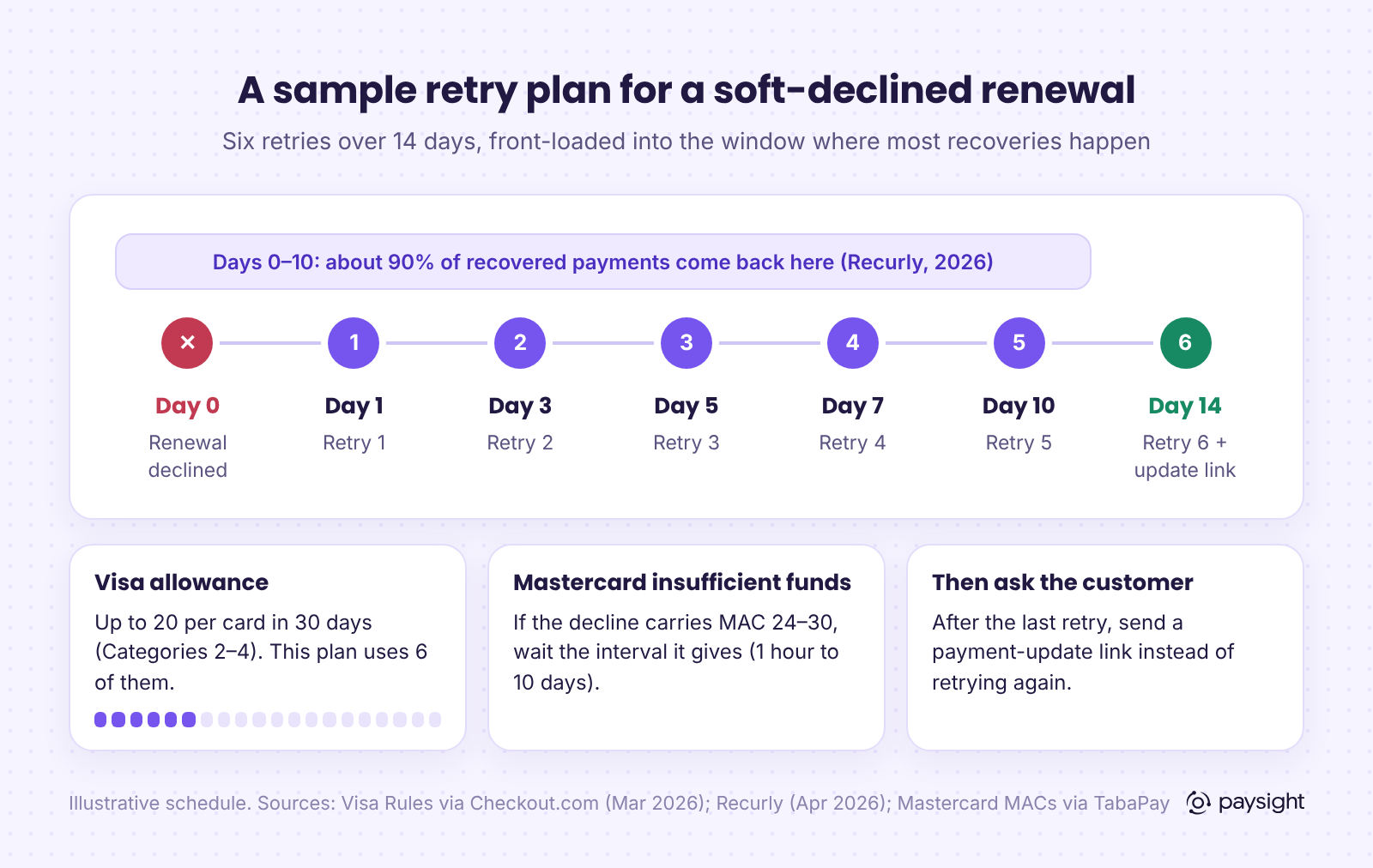
Where Mastercard gives a MAC 24–30, its timing replaces yours for that attempt. Some brands also line insufficient-funds retries up with common paydays; if you do, keep the total count inside the same cap.
Does retrying on another gateway or MID help?
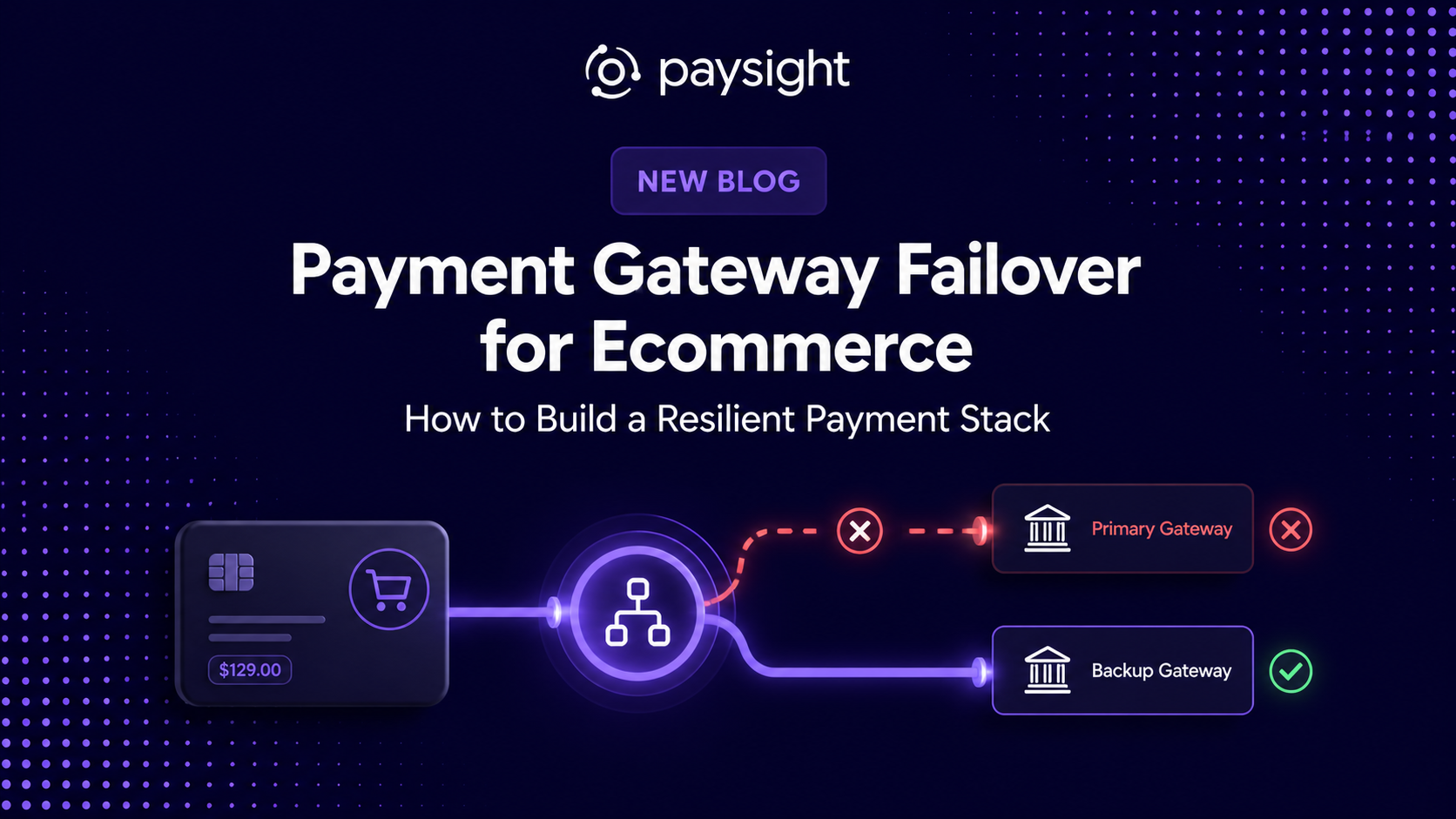
Sometimes, and it depends on who said no. If the failure came from the processing side (a timeout, a gateway outage, a processing_error), sending the next attempt through another connected gateway is a sensible redundancy step. That is what multiple routes are for.
If the issuer said no, a new route does not change the answer. The issuer is deciding about the card, not about your gateway. Visa's rules do not permit reattempting a Category 1 decline, Mastercard's MAC 03 says do not try again, and neither makes an exception for a different MID. Routing around an issuer's refusal is the kind of behavior these retry rules exist to stop. Treat extra gateways as resilience and approval-rate tools, not as a way to reset the retry counter.
What to measure
Recurly estimates that involuntary churn (subscribers lost to failed payments) accounts for 20% to 40% of total churn across subscription businesses (April 2026). To know whether your decline policy works, track a few numbers by decline type rather than in aggregate:
- Recovery rate by code: of renewals that failed with 51, 05, 54 and so on, how many were eventually paid. This shows where retries help and where they do not.
- Attempts per recovered renewal: if this creeps up, your schedule is retrying cards that will not clear.
- Hard-decline retries: the target is zero. Any non-zero count is a rules breach and a fee.
- Retries per card per 30 days: the highest count in your data should sit well below 20.
- Time to recovery: if most recoveries happen in the first week, late retries are adding cost for little return.
Where Paysight fits
Paysight is a platform for launching and managing subscriptions on the gateways and merchant accounts you connect, such as Stripe, NMI, Finix or your own MIDs. It does not process payments or decide approvals; the issuer still makes that call.
What it does is keep subscription, transaction and customer data in one place, so your team can see which renewals failed, with what response, and what happened next. On top of that, Paysight runs retries and routing across the gateways you connect, a card account updater for expired and replaced cards, and customer care portals where subscribers can update their payment method themselves. The aim is the policy in this guide: retry the declines that can recover, fix the data on the ones that need it, and hand the hard declines to the customer quickly.
Sources
- Visa: Updates to rules for declined transaction resubmission and use of authorization response codes (Sept 2020, effective April 2021)
- Checkout.com: Changes to Visa system integrity fees (March 2026)
- Kalixa (PXP): Visa system integrity fees, decline categories and reattempt limits
- Adyen Docs: Visa integrity fees
- TabaPay: Transaction integrity network fees (Visa reattempts, Mastercard TPE)
- PayPal: How to avoid excessive retries penalties (May 2026)
- TabaPay: Mastercard Merchant Advice Codes
- IXOPAY: Mastercard Transaction Processing Excellence excessive authorizations fee
- Braintree: Mastercard network updates 2024 (excessive authorization attempts)
- TD Merchant Solutions: network fee changes, 2026
- Stripe Docs: Card declines and advice codes
- Stripe Docs: Decline codes
- Recurly: Failed payment recovery, a data-based strategy (April 2026)
A soft decline is a temporary refusal, such as insufficient funds or an issuer system being unavailable, and the payment may succeed if you retry later. A hard decline means the issuer will not approve that card for that payment, for example because it was reported lost or stolen or the account is closed. Soft declines can be retried within network limits; hard declines should not be retried at all.
Visa's Category 1 codes must not be reattempted: 04, 07, 12, 14, 15, 41, 43, 46, 57, R0, R1 and R3. On Mastercard, a Merchant Advice Code of 03 (do not try again) or 21 (payment cancellation) means stop. In each case, ask the customer for a new payment method instead, and treat R0, R1, R3 or MAC 21 as a sign the cardholder has stopped the recurring payment.
As of October 2026, Visa allows up to 20 reattempts per card in 30 days for decline Categories 2, 3 and 4, and none for Category 1. Mastercard charges fees once declined attempts on the same card at the same merchant pass 10 in 24 hours or 35 in 30 days. Stripe recommends no more than eight retries, and most recoveries happen within about 10 days.
Code 05 is Visa's generic Category 4 decline, so it can be retried within the 20-in-30-days limit. It gives no reason, though, and repeated 05 responses usually mean the issuer will keep declining. A sensible approach is two or three spaced retries, then asking the customer to contact their bank or update their card.
Insufficient funds (code 51) is a soft decline, so schedule spaced retries over the following days rather than retrying immediately. If the card is a Mastercard and the decline includes a Merchant Advice Code from 24 to 30, wait the interval it specifies, from 1 hour to 10 days. If the retries fail, send the customer a link to update their payment method.
No. The issuer is declining the card, not your gateway, so a different route does not change the answer, and Visa's rules do not permit reattempting a Category 1 decline on any route. Extra gateways are useful when the failure is on the processing side, such as a timeout or outage, not as a way around an issuer's refusal.
A Merchant Advice Code (MAC) is a code Mastercard returns with a decline to tell you what to do next. MAC 01 means new card details are available, 02 means try again later, 03 means do not try again, 21 means the cardholder cancelled the payment, and 24 to 30 tell you exactly how long to wait before retrying an insufficient-funds decline.


.svg)





.png)




Company Reg. No. 760371
VAT No. IE4280069RH


