


What Is a Card Account Updater (and Why the Wrong One Can Lock You Into Your Processor)


Card account updaters automatically refresh expired or reissued card data to prevent failed payments. Learn how CAU works, who needs it, and why PSP-based CAU can lock you into your processor.
Every subscription business has the same silent revenue leak: a customer's card expires, gets replaced after a fraud incident, or is reissued by their bank. The stored token your billing system holds becomes invalid overnight. The next charge fails. The customer doesn't know why. Their access gets cut off, they get frustrated, and half the time they don't come back.
This isn't a fringe problem. A 2023 PYMNTS and FlexPay study of 200 subscription business executives found that failed payments account for 50% of all subscriber churn, not customers actively choosing to leave. Expired and replaced cards are a leading contributor. The revenue loss is real, the churn is involuntary, and most of it is preventable.
Card account updaters (CAU) are the infrastructure that prevents it. But how CAU is implemented and where it lives in your payment stack determines whether it actually protects your revenue or quietly creates a new dependency you'll pay for later.
What a Card Account Updater Actually Does
A card account updater is an automated service that keeps your stored customer card data current without requiring the customer to do anything.
Here's the problem it solves: when you store a customer's card for recurring billing, you store a specific card number and expiration date. Cards expire every two to five years. Banks reissue cards after fraud incidents, portfolio migrations, or product changes. When that happens, the card number changes — and the token you stored becomes invalid.
Without a CAU, the next charge simply fails. Your billing system retries. The customer gets a dunning email asking them to update their payment details. Some do. Many don't. The subscription lapses.
With a CAU, the process looks different:

The customer's billing continues uninterrupted. No dunning email. No failed charge. No involuntary churn.
Batch Updates vs. Real-Time Updates
CAU operates in two modes, and the difference matters for subscription businesses running on tight billing cycles.
- Batch CAU runs on a scheduled basis — weekly or monthly. Your processor submits a file of stored cards to the network, receives back a file of updates, and applies them before the next billing run. This works well for businesses with predictable billing cycles and enough lead time to run updates before charges go out. The limitation is timing: a card reissued the day after a batch run won't be updated until the next cycle, which means the next charge may still fail.
- Real-time CAU operates at the moment of the transaction. When a charge is declined due to outdated card information, the processor immediately queries the network for updated details and retries the payment with the refreshed data in the same transaction attempt. For subscription businesses where billing happens continuously, real-time CAU eliminates the gap between a card change and the next successful charge.
The practical implication: batch CAU reduces failures across your portfolio on a schedule. Real-time CAU eliminates the failure window entirely for individual transactions. The strongest implementations combine both — batch updates for proactive refresh before charges go out, real-time updates as a fallback when a charge is declined anyway.
Who Needs Card Account Updater
Any business that stores customer payment credentials and charges them on a recurring basis benefits from CAU. The impact scales directly with your subscription volume and the length of your average customer relationship.
- SaaS and software businesses bill monthly or annually across large customer bases. Annual subscribers are particularly exposed — a card reissued twelve months into a subscription has a high probability of being replaced before renewal.
- Subscription commerce — subscription boxes, curated product deliveries, membership programs — typically bills monthly with no end date. Every long-term subscriber will eventually have a card expire. Without CAU, each expiration is a churn risk.
- Streaming and digital content services bill at low price points with minimal friction. Customers rarely think about their payment method until it fails — at which point re-engaging them requires active effort. CAU keeps the payment invisible, which is exactly the experience subscribers expect.
- Gyms, wellness, and service memberships often have annual or quarterly billing with members who've been subscribers for years. These long-tenured customers represent your highest lifetime value — and the highest probability of a card change somewhere in their billing history.
- Installment plans and BNPL arrangements where a customer has committed to a payment schedule face the same problem: a card change mid-schedule breaks the commitment, not through any intent by the customer, but through a billing infrastructure failure.
Across all of these models, up to 15% of payment declines come from outdated card details. At meaningful subscription volume, that's not a rounding error; it's a revenue line.
The Problem with PSP-Based CAU
Most payment processors offer CAU as a feature of their platform. Stripe, Braintree, Adyen, and others all provide some form of card updating within their own ecosystem. For businesses on a single processor, this seems like the obvious solution. The CAU is built in, the updates happen automatically, and the integration is zero effort.
The problem surfaces when you look at where the updated data lives.
When your processor runs a CAU update, the refreshed card details are stored in that processor's vault. The token they return to you is specific to their platform. If you move to a different processor (or if you operate across multiple processors), those updated tokens don't travel with you.
Concretely: a customer whose card was reissued twelve months ago has an updated token in Processor A's vault. When you route their next subscription charge through Processor B, Processor B has the original token, which is now outdated. The charge fails. Processor A had the right data. Processor B doesn't. Your customer experiences a payment failure that CAU was supposed to prevent.
This creates a structural lock-in that most merchants don't notice until they're in the middle of a processor migration or trying to build multi-acquirer redundancy. The updated card data is an asset, and it's locked to a single provider.
The implications compound over time. A merchant who has been running CAU through their PSP for two years has two years of card updates accumulated in that processor's vault. Migrating processors means starting the update cycle from scratch with stale token data, a period of elevated failed payments, and avoidable churn, even though the underlying CAU data already existed.
Orchestration-Layer CAU: How It Should Work
When your CAU lives inside a processor's vault, the updated data stays there. Route a charge through a different acquirer or add a new one, and that processor sees your original, potentially outdated token. The update existed. It just wasn't available where the charge happened.
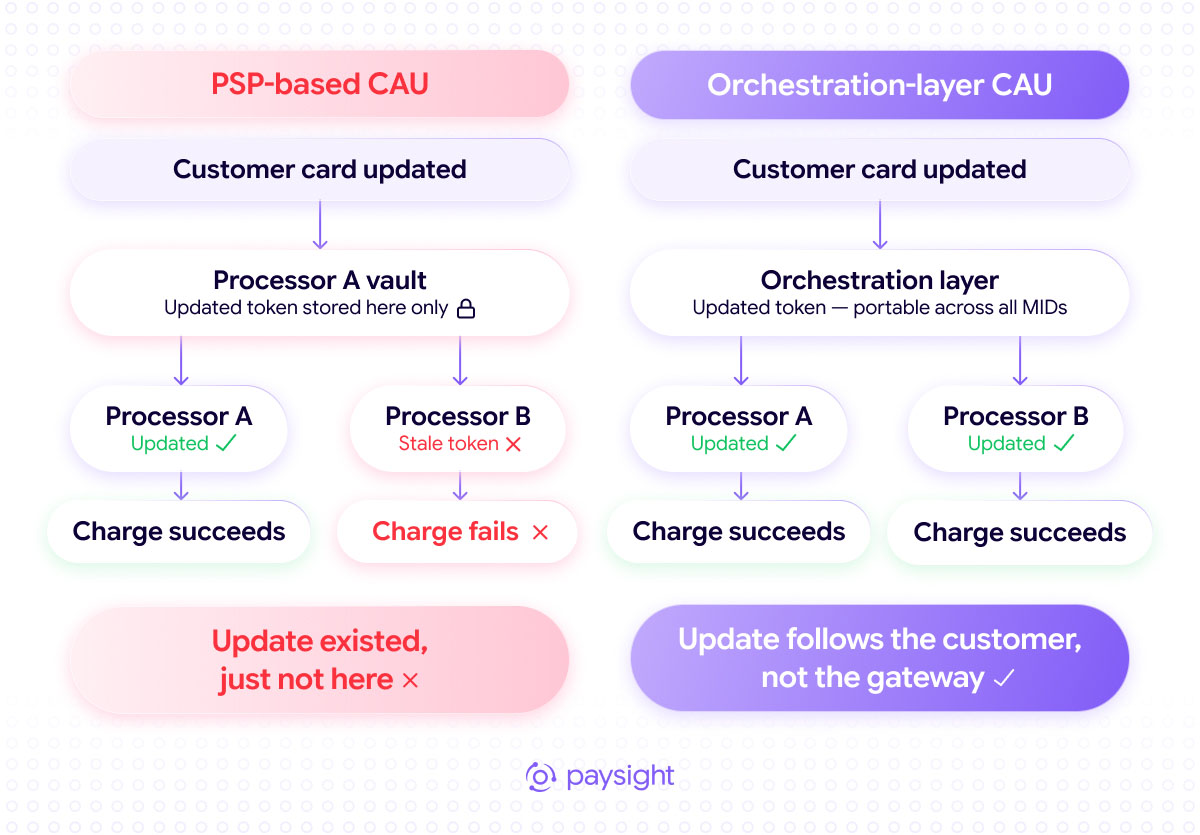
Orchestration-layer CAU stores updated tokens above the processor level. Every acquirer in your routing configuration pulls from the same updated data. Switch processors, add a MID, or reroute traffic for any reason. The card update follows the customer, not the gateway.
How Paysight's CAU Fits into the Broader Stack
Paysight is a payment orchestration platform; it connects your business to multiple acquiring relationships and manages how traffic flows between them. Card account updater is a native component of that infrastructure, not a bolt-on feature tied to a single processor.
When a customer's card is updated through Paysight's CAU, the refreshed data is stored at the orchestration layer and available across all connected acquirers. Route a charge to Acquirer A today and Acquirer B tomorrow — the updated card data is present in both cases. Add a new processor to your stack — existing card updates apply immediately.
This matters in practice because the other components of subscription revenue protection all need to work together:

Each component addresses a different failure mode in the subscription revenue lifecycle. CAU handles the card data problem. Subscription management handles the retry and communication problem. Chargeback alerts handle the dispute problem. Orchestration handles the routing and continuity problem.
Running all four through a single orchestration layer means they operate on consistent data, apply to every transaction regardless of which acquirer processes it, and don't create processor-specific dependencies that constrain your infrastructure decisions later.
If your business runs on recurring revenue and you want to understand what complete subscription protection actually looks like in practice, talk to Paysight.
A card account updater is an automated service that refreshes stored customer card data when cards expire or get reissued by querying Visa, Mastercard, Amex, and Discover updater services. The customer does nothing, and the next charge uses the updated details.
Cards are reissued because of scheduled expiration, fraud-related replacement, bank portfolio migrations, and technology upgrades. For any long-tenured subscriber, a card change is likely at some point in the relationship.
Batch CAU runs on a weekly or monthly schedule and refreshes cards before billing runs. Real-time CAU activates when a transaction is declined, retrieves updated details, and retries immediately. The strongest implementations use both.
Visa, Mastercard, Amex, and Discover all maintain updater services, although coverage and mechanics vary by network. Orchestration-layer CAU can query multiple networks through one integration.
PSP-based CAU stores updated tokens inside one processor's vault. If a charge is routed through another processor, that provider may still see the original outdated token, causing a payment failure even though updated card data exists elsewhere.
Orchestration-layer CAU stores updated tokens above the processor level so they remain available across all acquirers in a merchant's routing configuration. The update follows the customer when processors are added, changed, or rerouted.
No. The process happens behind the scenes, so the customer's subscription can continue without interruption or any action from them.
No. CAU solves the card-data problem. Complete subscription protection also requires retry logic, dunning flows, chargeback alerts, and routing optimization working on consistent data across the processor stack.


.svg)


.png)




Company Reg. No. 760371
VAT No. IE4280069RH


