


Introducing Paysight Care Portals: give customers more control over their purchases


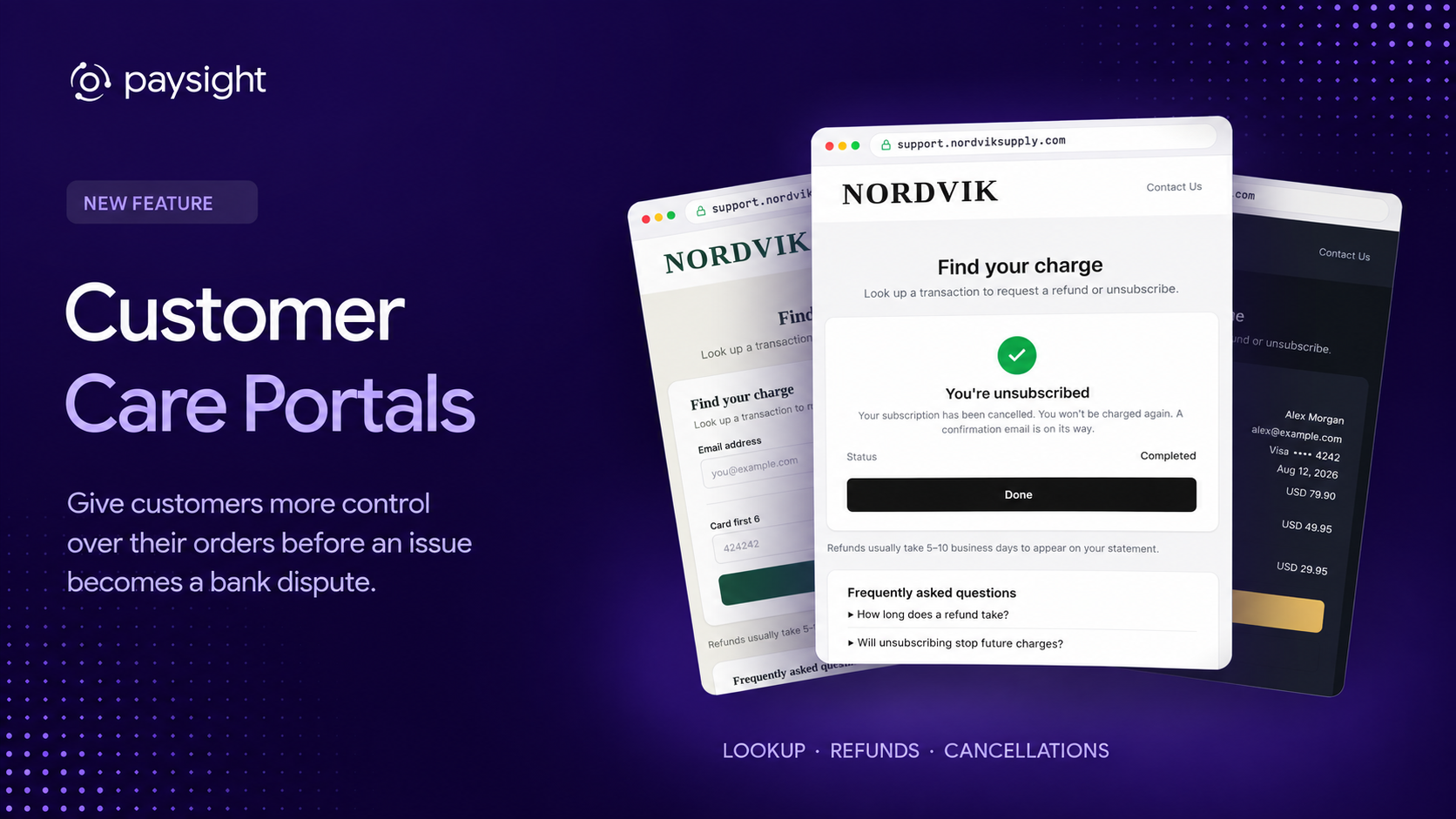
We've launched Care Portals to give your customers more control over their purchases, with a place to look up charges, request refunds and cancel subscriptions directly with your business. When customers can understand a payment and find a straightforward way to resolve a problem, they have less reason to turn to their bank for help.
Using the builder inside Paysight, you can create a portal that matches your store and runs on your own domain, while choosing which actions customers can complete themselves and which refund requests need your team's attention. Care Portals are available to all Paysight merchants as a permanent part of the platform's core functionality.
Help customers find and manage their purchases
Customers begin by finding their transaction through the lookup fields you enable, including their email address or the first six and last four digits of their card.
From there, they can select the matching transaction, complete verification where required, and see the actions available to them. Refund and cancellation confirmations make the outcome clear, while contact information and FAQs give you space to explain what happens next.
For the customer, that means a recognisable place to resolve a payment question without having to work out which team to contact first.
Build a portal that feels like part of your store
In the visual builder, you can start with a theme and adapt its logo, colours, typography and page styling to match your store. You can also arrange and edit the blocks for the header, introduction, lookup form, transaction results, action panel, images, help text and FAQs.
Connecting your own domain keeps that experience within a setting customers recognise, so looking up a payment or requesting a refund feels like dealing with the business they bought from.
Live previews let you check the different stages of the journey, from lookup and verification through to refund or cancellation confirmation, before publishing.
Choose how requests are handled
You decide how refund requests are handled, either allowing customers to complete eligible refunds themselves or routing requests to your team for review.
The settings also let you configure refund amounts, including full refunds or refunds for selected Shopify line items, and whether a refund should also unsubscribe the customer. Subscription cancellation has its own controls.
Alongside those settings, you can configure transaction lookup, one-time-code verification, bot protection, and notifications for your care team.
Customer care is part of payment health
A clear refund or cancellation path gives customers a way to resolve an issue directly with you before it escalates into a chargeback. Your branding, contact details and confirmation messages also help customers understand who they bought from and what is happening with their request.
By helping customers resolve these issues with you, Care Portals can help reduce avoidable disputes and support the health of your merchant accounts. Alongside clear billing, reliable fulfilment and responsive support, they give customers more confidence that your business will look after them after the sale.
How to get started
Before customising the page in the builder, you need to create your portal and complete the domain and email setup.
- Open Care Portals in the left-hand menu of your Paysight account, start the setup for a new portal and add the custom domain you want customers to use.
- Follow the setup instructions to verify domain ownership and add the required DNS records for the portal and email. You add these records through the provider that manages your domain's DNS, using the values shown in Paysight.
- Once the required verification checks are complete, confirm the setup to finish creating your portal.
- Open the portal's drag-and-drop builder to customise its theme, branding, layout, page content and FAQs. Review the refund and cancellation options, customer verification settings and team notifications.
- Preview the customer journey, then publish the portal and add a link from your store so customers can find it when they need help with a purchase.
Your account manager can help with the domain and email verification, portal configuration or any questions along the way.
Open Care Portals in the left-hand menu of your Paysight account and start the setup for a new portal. Add your custom domain, follow the domain ownership and portal/email DNS verification instructions, and confirm the setup. You can then open the portal's drag-and-drop builder to customise the customer experience. Your account manager can help with setup and questions.
Yes. The builder lets you customise the logo, colours, typography, page content and layout. You can also connect your own domain for the customer-facing portal.
No. You can choose self-service refunds that process instantly or a request-only flow that routes refund requests to your team. Refund availability and the amount customers can refund are configurable.
Yes. Care Portals and the builder are part of Paysight's core functionality and are available to all Paysight merchants.


.svg)


%25201.jpeg)
.png)

Company Reg. No. 760371
VAT No. IE4280069RH


